How to Increase Your YouTube Views for Free in 2026
Uploading a video is easy. Getting people to watch it is harder.
Many new creators publish useful videos but receive very few views. This does not always mean that their content is poor. The problem may be the topic, title, thumbnail, introduction, or promotion strategy.
The good news is that you do not need a large advertising budget to grow. You can improve your reach through better planning and optimization.
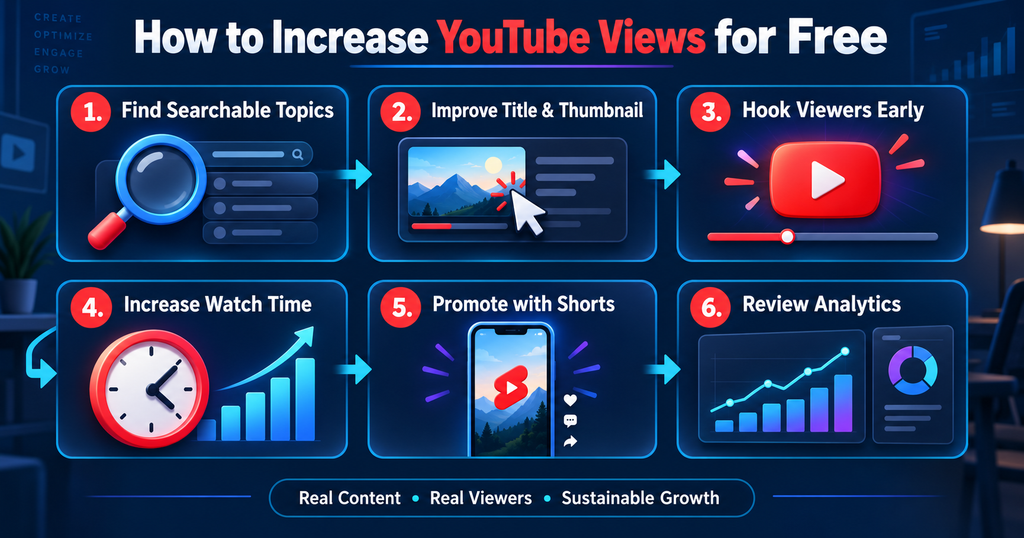
If you want to know how to increase your YouTube views for free, start by understanding what viewers want. Then create content that satisfies that need. Package the video with a strong title and thumbnail. Finally, use YouTube Analytics to improve future uploads.
There is no secret website that can safely generate unlimited views. Bots and view exchange services can harm your channel. Sustainable growth comes from real viewers who choose to watch your content.
This guide explains practical methods that creators can use without paying for views.
Table of Contents
Can You Really Increase YouTube Views for Free?
Yes, you can increase YouTube views without paying for advertising. However, free growth still requires time and effort.
YouTube can introduce your video to viewers through Search, Browse Features, Suggested Videos, Shorts, playlists, and external sources. Your task is to help the platform understand the video. You must also give viewers a good reason to click and continue watching.
Views usually grow when three things work together:
| Growth factor | What it means |
|---|---|
| Discovery | YouTube shows the video to suitable viewers |
| Clicks | The title and thumbnail encourage people to watch |
| Satisfaction | Viewers continue watching and enjoy the content |
A video may receive impressions but few views if its packaging is weak. It may attract clicks but stop growing if viewers leave early. This is why keywords alone cannot guarantee success.
1. Choose Topics People Already Want to Watch
Topic selection comes before filming. A beautifully edited video may fail if few people care about its subject.
Start with YouTube’s search bar. Type a phrase related to your niche. YouTube will display suggestions based on common searches. These suggestions can reveal real questions and topic ideas.
Suppose you have a cooking channel. Instead of targeting a broad subject such as “chicken recipe,” look for a more specific need. You might find phrases such as “easy chicken recipe without oven” or “quick chicken dinner for beginners.”
Specific topics are often easier for small channels to target.
You can also examine successful videos in your niche. Do not copy them. Study the questions they answer. Read their comments. Viewers often request missing information in the comments section. Those requests can become useful video topics.
Google Trends can help you compare topics. Set the search type to YouTube Search when that option is available. This can show whether interest is rising, falling, or seasonal.
2. Match Every Video to One Clear Search Intent
Search intent means the reason behind a viewer’s search.
Someone searching “how to edit a YouTube video” probably wants a tutorial. A person searching “best free video editor” wants a comparison. These viewers need different videos.
Choose one main purpose for each upload. Do not try to cover several unrelated subjects in the same video.
Your title, thumbnail, introduction, and content should promise the same result. If the title offers a beginner tutorial, the video should not assume advanced knowledge.
This alignment helps viewers understand your content quickly. It can also improve satisfaction because people receive what they expected.
3. Write a Clear and Searchable Video Title
A useful title tells viewers exactly what they will gain.
Include the main search phrase when it fits naturally. Place important words near the beginning. This helps viewers understand the subject on smaller screens.
Avoid stuffing several keywords into one title. It looks unnatural and may reduce clicks.
Compare these examples:
| Weak title | Improved title |
|---|---|
| YouTube Tips and Tricks Free Views Fast | How to Get More YouTube Views Without Ads |
| My New Editing Tutorial | How to Edit YouTube Videos on Your Phone |
| Best Tips You Must Know | 7 Thumbnail Mistakes That Reduce Your Views |
The improved versions are specific. They also communicate a clear benefit.
Do not use a misleading title. A dramatic promise may generate initial clicks. However, viewers will leave when the video fails to deliver. That can damage trust and retention.
4. Create a Thumbnail That Is Easy to Understand
Your thumbnail and title work as one package. The title provides context. The thumbnail creates visual interest.
Use one clear focal point. This could be a face, product, result, or important object. Remove unnecessary details. Small elements can disappear on mobile devices.
Use strong contrast between the subject and background. If you add text, keep it short. The text should complement the title instead of repeating it.
For example, a title may say “How I Improved My Video Quality.” The thumbnail could show a before and after comparison with the words “Phone Only.”
YouTube states that custom thumbnails are used by many of its best-performing videos. You can design one with free tools such as Canva or Adobe Express.
Check the thumbnail at a small size before uploading it. If the main message is unclear, simplify it.
5. Capture Attention During the Opening Seconds
A slow introduction can make viewers leave.
Do not begin with a long logo animation. Avoid spending too much time introducing yourself. Start with the problem and expected result.
A good introduction can follow this structure:
First, identify the viewer’s problem.
Second, show the outcome they can expect.
Third, explain what the video will cover.
For example:
“Your videos may be getting impressions but very few clicks. In this tutorial, I will show you how to improve your title, thumbnail, and retention using free tools.”
This opening is direct. It confirms that the viewer has opened the right video.
6. Improve Audience Retention
Audience retention shows how much of your video people continue watching. You can review this information in YouTube Studio.
Open the retention graph for each video. Look for sudden drops. A drop may indicate a confusing section, long pause, repeated point, or irrelevant promotion.
Remove unnecessary material during editing. Keep the pace suitable for your audience. A tutorial should be clear. An entertainment video may need faster visual changes.
Use examples to explain important points. Add screen recordings when teaching a process. Use relevant visual changes to maintain interest.
Do not make a video longer only to increase watch time. A focused six-minute video can be more useful than a repetitive fifteen-minute video.
7. Write a Helpful Video Description
The description gives YouTube and viewers more context.
Use the first two or three lines to summarize the video. Include your primary keyword naturally. Do not paste a long block of unrelated keywords.
After the summary, add relevant resources. You can include links to related videos, playlists, your website, or tools mentioned in the tutorial.
Add a brief call to action. Ask viewers to watch a related video or subscribe if they found the content useful.
A description should be written for humans first. It should accurately explain the video.
8. Add Chapters and Accurate Captions
Chapters divide a long video into useful sections. They help viewers reach the information they need.
Start the first timestamp at 00:00. Give every chapter a short and descriptive name.
For example:
00:00 Introduction
01:10 Find video topics
03:25 Create better titles
05:40 Improve thumbnails
08:15 Read YouTube Analytics
Captions also improve accessibility. They help viewers who cannot use audio. They can also clarify speech when sound quality or pronunciation makes a word difficult to understand.
Review automatic captions before publishing. Correct names, technical terms, and important phrases.
9. Connect Related Videos With Playlists and End Screens
Do not treat every upload as an isolated page.
Create playlists around one topic. A playlist could contain beginner tutorials, product reviews, exam lessons, or weekly updates.
Place videos in a logical order. This makes it easier for viewers to continue learning.
Use an end screen to recommend the most relevant next video. You can also mention that video before the current one ends.
Avoid saying only, “Watch another video on my channel.” Give a reason.
You might say:
“If you have improved your thumbnail, watch this next tutorial to learn how to increase audience retention.”
This creates a natural path between your videos.
10. Use YouTube Shorts to Reach New Viewers
YouTube Shorts can introduce your channel to people who have never seen your long videos.
Take one useful moment from a longer upload. Turn it into a short and complete piece of content. Add captions because many people watch short videos without full sound.
Do not upload a random clip that lacks context. The Short should still offer a tip, result, answer, or entertaining moment.
When appropriate, connect the Short to a related long-form video through YouTube’s related video feature. This gives interested viewers a clear next step.
One long video can provide several Shorts. This saves production time while expanding your reach.
11. Promote Videos Without Spamming
External promotion can generate early traffic. However, the video must be relevant to the people receiving it.
Share it on Instagram, Facebook, WhatsApp, X, LinkedIn, or another platform where you already have an audience. Write a short explanation instead of posting only a link.
You can answer relevant questions on Quora or participate in suitable Reddit communities. Read each community’s rules first. Provide a useful answer before mentioning your video.
If you own a blog, create a related article and embed the video. The article should offer genuine value. It should not exist only to hold a video link.
Avoid dropping links into unrelated groups. Uninterested clicks may lead to short viewing sessions. Spam can also damage your reputation.
12. Publish on a Schedule You Can Maintain
Consistency helps you build a library and learn from repeated uploads. It does not mean you must publish every day.
Choose a realistic schedule. One useful video each week is better than seven rushed videos followed by a month of silence.
Batch similar tasks when possible. You can research several topics on one day. Write scripts on another day. Record multiple videos in one session.
Quality and consistency should support each other. Do not sacrifice accuracy simply to meet an aggressive upload schedule.
13. Use YouTube Analytics to Make Decisions
YouTube Analytics can tell you where your growth process is failing.
Check impressions and click-through rate together. A video with many impressions but few clicks may need a better title or thumbnail.
Check average view duration and audience retention. A strong click-through rate with poor retention may indicate that the video does not meet the promise.
Review traffic sources. Search traffic can show which queries bring viewers. Suggested Video traffic can reveal which videos YouTube connects with your content.
Look at returning viewers too. Returning viewers suggest that people find enough value to come back.
Do not judge a video from one metric. YouTube explains that click-through rate varies by audience and traffic source. Compare videos within your own channel and niche.
14. Update Older Videos That Still Have Potential
You do not always need a new upload to get more views.
Find older videos that still receive impressions. Update their titles or thumbnails if their click-through rates are weak. Make one major change at a time so you can evaluate the result.
Add new chapters or correct the description. Place the video inside a relevant playlist. Link to it from newer uploads.
Do not change a successful video without a clear reason. Focus on videos that cover valuable topics but have weak packaging.
Avoid Fake Views and View Exchange Services
Never use bots, automatic refresh tools, or view exchange groups.
YouTube’s Fake Engagement Policy prohibits artificial methods that increase views, likes, comments, subscribers, or other metrics. Artificial traffic may be removed. Serious violations can also lead to warnings, strikes, or channel termination.
Fake views do not build a real audience. Bots will not become loyal viewers or customers. They may also produce poor retention and unreliable analytics.
Services that advertise “free unlimited views” should be treated carefully. Never provide your Google password or verification code to such a website.
Also, check How to Get Unlimited Views for Free: 15 Proven Methods
Frequently Asked Questions
How can I get 1,000 YouTube views for free?
Choose a searchable topic. Create an accurate title and strong thumbnail. Promote the video to a relevant audience. Use Shorts, playlists, end screens, and external platforms to expand its reach. There is no guaranteed timeframe.
Do tags increase YouTube views?
Tags can provide context and help with common spelling variations. However, titles, thumbnails, viewer satisfaction, and content relevance are usually more important. Do not fill the tag field with unrelated phrases.
How often should a new creator upload?
Choose a schedule you can maintain without reducing quality. For many beginners, one well-produced video each week is a practical starting point.
Should I buy YouTube views?
Buying artificial views is risky and does not create a genuine audience. If you later decide to pay for promotion, use legitimate advertising options. This article focuses on organic methods that do not require a budget.
How long does it take to get more views?
There is no fixed timeline. Some videos grow quickly. Others gain views gradually through search. Results depend on the topic, competition, packaging, retention, and audience response.
Final Thoughts
Learning how to increase your YouTube views for free is not about finding a hidden trick. It is about improving every stage of the viewer journey.
Choose a topic people want. Create an honest title and clear thumbnail. Deliver value quickly. Keep the video focused. Then guide viewers toward another relevant upload.
Use YouTube Analytics as feedback. If people do not click, improve the packaging. If they leave early, improve the content and opening. If they watch but do not continue, strengthen your playlists and end screens.
Most importantly, focus on real viewers. Sustainable channel growth comes from trust, useful content, and continuous improvement. These methods may take time, but they can build an audience that returns for future videos.


One Comment